Why connect NewzAI to your assistant?
Chat assistants are great at reasoning but don't know what happened this morning. Web search helps, but it hands the model a pile of overlapping articles to read and de-duplicate.
NewzAI does that work first. It groups coverage of the same story from many publishers into a single cluster, summarises it, and keeps the sources attached. Through the Model Context Protocol (MCP), your assistant can pull those clusters directly — from a quick list of headlines to the full set of related articles — and can read and update your personal NewzAI feed too.
The NewzAI MCP server is in use today with Claude, ChatGPT and OpenClaw.
What you need
- The server URL:
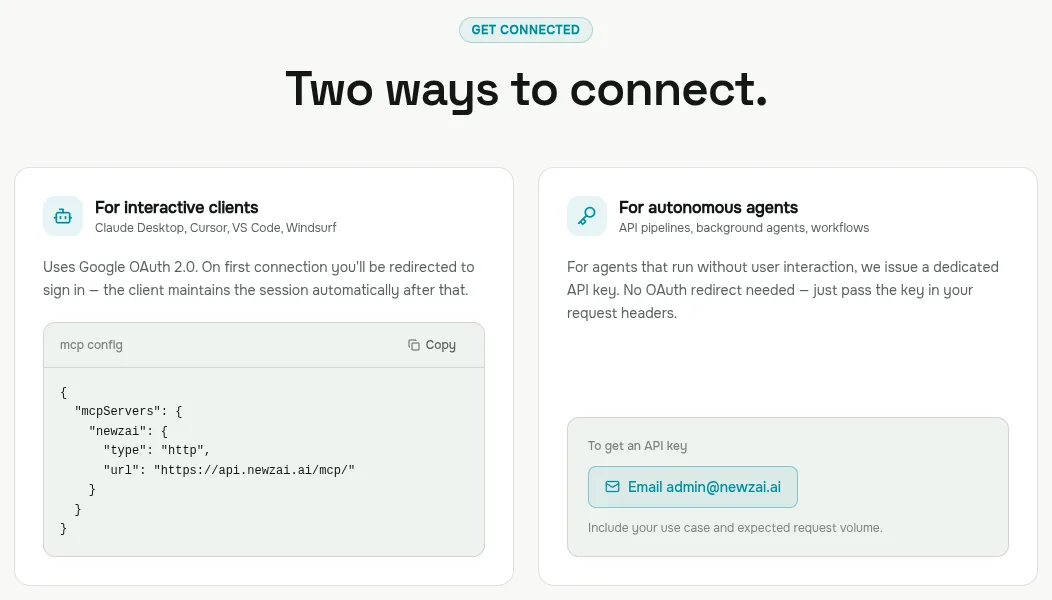
https://api.newzai.ai/mcp/ - A Google account. The server uses Google sign-in (OAuth 2.0): you approve access once and the client keeps the session.
- Optional: a NewzAI account with some Spaces, if you want your assistant to read your personal feed.
Connect NewzAI to Claude
Claude (web and desktop app)
- Open Settings → Connectors.
- Choose Add custom connector, name it “NewzAI”, and paste
https://api.newzai.ai/mcp/as the URL. - Select Connect and sign in with Google.
- In a new chat, make sure NewzAI is enabled in the tools menu, then ask for the news.
Claude Desktop config, Claude Code, Cursor, VS Code
Clients that use an MCP config file accept this entry. On first use you'll be sent to Google sign-in:
{
  "mcpServers": {
    "newzai": {
      "type": "http",
      "url": "https://api.newzai.ai/mcp/"
    }
  }
}
Connect NewzAI to ChatGPT
ChatGPT adds MCP servers as custom connectors (also called apps). Menu names vary a little between plans:
- Open Settings → Apps & Connectors and, under Advanced settings, turn on Developer mode. On workspace plans an admin may need to allow this first.
- Choose Create (or Add custom connector), name it “NewzAI”, and paste
https://api.newzai.ai/mcp/as the server URL. - Pick OAuth for authentication. ChatGPT reads the rest of the OAuth settings from the server, so you don't need to fill them in.
- Save, sign in with Google when asked, and you'll be returned to ChatGPT.
- In a chat, add NewzAI from the tools (+) menu and ask your question.
Connect NewzAI to OpenClaw
From the Control UI
- Open the Control UI and go to Settings → MCP.
- Under Configured servers, select Add server.
- Name it
newzai, choose the Streamable HTTP transport, and enterhttps://api.newzai.ai/mcp/. - Select Add server, set the server to use OAuth in the config editor on the same page, then use Sign in on the server row and approve Google sign-in.
From the terminal
Add the server:
openclaw mcp add newzai \
  --url https://api.newzai.ai/mcp/ \
  --transport streamable-http
Make sure the saved entry in openclaw.json uses OAuth:
{
  "mcp": {
    "servers": {
      "newzai": {
        "url": "https://api.newzai.ai/mcp/",
        "transport": "streamable-http",
        "auth": "oauth"
      }
    }
  }
}
Then sign in and check that the tools are visible:
openclaw gateway stop
openclaw mcp login newzai
openclaw gateway start
openclaw mcp doctor newzai --probe
mcp login prints a Google authorization URL; OpenClaw saves the credentials once you approve. doctor --probe should list the NewzAI tools below.
What your assistant can do with NewzAI
| Tool | What it does |
|---|---|
get_news_headlines | Latest headlines for a region — title and source only. Fast and light. |
search_news | Free-form search (keyword, meaning-based or hybrid) with recency filters. |
get_related_news | The full cluster of related articles around a story — the deepest view. |
get_news_by_category | News for a predefined category such as Technology, Business or Sports. |
get_user_preferences | Lists the Spaces saved to your NewzAI account. |
get_news_by_preference | Your personal feed for one of those Spaces. |
set_user_preferences | Adds new Spaces to your account from the chat. |
The last three tools work with the Spaces in your NewzAI account — the same ones you see in My Feed in the Android app and on the web. A Space added from chat shows up in the app, and vice versa.
Prompts to try
- “What are the top headlines in Japan right now?”
- “Search the news for India startup funding in the last 24 hours.”
- “Give me the full story cluster on the Mekedatu dam row, with sources.”
- “What's in my NewzAI feed today?”
- “Add a NewzAI Space for “Fed interest rates”, International, in English.”
For a sense of what clustered coverage looks like once it's turned into writing, see our weekly AI news roundup or how Anthropic edged ahead of OpenAI in valuation.
Next: get a daily news brief in WhatsApp
Connected OpenClaw? Turn NewzAI into a daily AI brief, football brief or market wind-up delivered to your chat with one skill and one automation: How I set up NewzAI for my daily tech wind-up using OpenClaw.
Building an agent or pipeline?
Agents that run without a person to click through sign-in can use a dedicated API key instead of OAuth. Email [email protected] with your use case and expected request volume. More details, including a live playground, are on the NewzAI for AI page. If you're curious how OAuth and API keys work side by side, read how we secured NewzAI MCP.